.svg)
How to Build a SaaS Product: Steps, Architecture, and Launch Checklist

- A SaaS product is more than software. It blends the technology of an application with a subscription model and operational responsibilities. You must validate the idea, design a pricing strategy, pick an architecture, build an MVP and plan for onboarding, billing and ongoing support.
- Start with the business model and the user journey. Identify your ideal customer, their pain and willingness to pay before writing a single line of code. Define a minimum viable product (MVP) that solves a core problem, and prioritise features using frameworks like MoSCoW.
- Partner with a team that goes beyond coding. Successful SaaS development requires product strategy, UX/UI design, robust engineering and marketing. Look for a long‑term partner who understands multi‑tenant architecture, billing, security, handoff processes and flexible support.
Building a software‑as‑a‑service platform is not just about writing code. A SaaS product is a business, a subscription model and a continuous operation rolled into one. It delivers software through the internet as a service, and customers pay a recurring fee instead of buying a one-off license.
Unlike a simple app, a SaaS application must handle billing, onboarding, security, architecture decisions and ongoing maintenance. This is where SaaS software development becomes critical, because building a SaaS product means designing not just functionality, but a scalable, secure and continuously evolving platform.
This guide breaks down everything you need to know to plan, design, develop and launch a successful SaaS platform, drawing on industry research and the practical experience of the Rattlesnake Group, a boutique studio that blends design, development and marketing.
What a SaaS product is (and what it isn’t)
SaaS stands for software as a service. Rather than buying a licence and installing software on their own computers, customers subscribe to an online service delivered from the provider’s servers. The provider handles maintenance, updates, infrastructure and security. This model is a form of cloud computing.
Popular examples include Salesforce, Dropbox and Google Workspace. SaaS products are accessible anywhere, are cost‑effective to roll out and can be updated continuously. The trade‑off is that customers trust the vendor with their data, have limited ability to customise the software and rely on internet connectivity.
To see how SaaS differs from traditional software and marketplaces, compare the delivery model, pricing and operations:
- As the table shows, a SaaS platform is hosted by the vendor, uses subscription or usage‑based pricing, and includes continuous operations and support. Traditional software is installed on the customer’s premises, usually purchased with a one‑time licence and maintained by the buyer. A marketplace connects buyers and sellers and earns transaction fees; it is not the same as a SaaS product, though some SaaS companies build marketplace features.
- The subscription model distinguishes SaaS from other models. Customers pay monthly or annually for access, and the provider must keep them engaged to minimise churn. Because revenue depends on retention, onboarding and customer success become core parts of the product. A great SaaS platform is therefore as much about operational excellence as it is about technology. In practice, successful SaaS platform development requires building the right systems for reliability, scalability and long-term performance, not just shipping features.
Validate the idea before you write code
Many founders make the mistake of jumping straight into development. Rattlesnake’s experience and industry research show that the right first step is validation. Validation means ensuring that you are solving a real problem for a specific customer and that those customers will pay for your solution. Invest time in understanding your ideal customer profile (ICP), their pain points and the alternatives they currently use. For a SaaS product to succeed, you need:
- Problem–solution fit. Identify a pain that is significant and frequent enough to warrant a paid subscription. Talk to potential users, map their workflows and gather evidence that your solution would make a measurable difference.
- Willingness to pay. Test price sensitivity early. Ask whether potential customers would pay a monthly fee, and how much. A free product without a clear monetisation path often struggles to become a sustainable SaaS business.
- Competitor mapping. Study existing SaaS applications in the same niche. Determine what features are table stakes and what differentiators could set you apart. Note their pricing models and positioning.
Validation is not a one‑off event. Throughout the development process, you should test assumptions with real users and adjust based on feedback. When you can articulate who your first paying customer is, what problem you solve and why your solution is better, you have a solid foundation for building a minimum viable product (MVP).
Choose a SaaS business model early (pricing + packaging)
Pricing is not just a financial decision; it influences architecture, feature design and user behaviour. There are several common SaaS pricing models: tiered, flat‑rate, usage‑based, credit‑based, per‑user, feature‑based, freemium and hybrid. Each has advantages and trade‑offs. Use the following table to decide which model fits your product:
- Tiered pricing segments customers into plans with increasing functionality or limits. It supports different segments but can push users into higher plans prematurely.
- Flat‑rate pricing offers one plan for everyone. It is simple to explain, but may not scale with varied usage.
- Usage‑based pricing bills customers per unit of usage (e.g., per API call or gigabyte). It aligns price with value for users with variable consumption but makes revenue unpredictable for the vendor.
- Hybrid models combine different approaches (for example, a base subscription plus metered add‑ons). They offer flexibility but add complexity to billing and entitlements.
Your packaging defines which features, limits and support levels are included in each plan. Good packaging:
- Aligns with the value drivers for each segment. Power users may need advanced reporting and integrations; entry‑level users may only need core functionality.
- Encourages natural upgrades. When users grow their usage or team, they should perceive value in moving to the next tier rather than feel forced.
- Considers entitlements (who gets what), metering (how you count usage) and the billing system. These decisions drive your architecture. For example, usage‑based pricing requires data collection and real‑time metering; per‑seat pricing requires a robust user management system.
Rattlesnake advises founders to pick a business model early because it affects many downstream decisions. If you plan to charge by usage, you may choose a multi‑tenant architecture that separates tenant data by a tenant_id and includes a meter service. If you plan a freemium model, you need a clear upgrade path and a secure way to limit access for free users. Clarifying these choices early prevents costly refactoring later.
Define the MVP for your SaaS product
A Minimum Viable Product (MVP) is the smallest version of your product that still solves the core problem and allows you to learn from real users. An MVP is not a prototype; it is a functional product that generates feedback and revenue. Codevelo emphasises that an MVP must answer whether the solution solves a real problem and whether users would pay for it. It should focus on one primary user outcome and map a simple journey from sign‑up to value.
There are nine principles for building a SaaS product. The first is start with the business model, not the architecture. Define monetisation (subscription, usage‑based or hybrid), decide whether there will be a free tier or trial, articulate the value proposition, pick the target audience and identify the key workflow. This business clarity guides what goes into the MVP.
Use a prioritisation framework like MoSCoW (Must, Should, Could, Won’t) to decide which features belong in the initial release. The following matrix illustrates how to categorise features:
In general, the must-have column includes the core problem solution, basic authentication and security, onboarding flow and reliable data storage and backups. The should have column contains secondary features such as integrations and payment gateways; these can be built once you have feedback. The latter column lists advanced analytics, marketplace features, marketing tools or other differentiators that you can defer to later phases. Avoid the trap of trying to build everything; a lean scope accelerates delivery and yields useful feedback.
The critical role of onboarding
Onboarding is more important than functionality in the early stages. A key metric for SaaS is Time to First Value (TTFV) – the time between a user’s registration and the moment they receive meaningful value. Shorter TTFV correlates with higher satisfaction and retention. In Rattlesnake’s experience, good onboarding includes pre‑loaded data, a quick‑start guide, configuration templates and contextual tips. Investing here ensures users see the benefit quickly and remain engaged.
How to build a SaaS product step by step
The following sequence summarises how to build a SaaS product from idea to launch. Each step produces a tangible output, which helps stakeholders align expectations and track progress.
1. Define product requirements and user flows
Document the problem you are solving, the user roles and the core user journeys. List the main actions users need to take to achieve the first value. This scope becomes the foundation of your MVP and influences the rest of the project.
2. Design a UX prototype
Create a clickable prototype using tools like Figma. Focus on the most important screens (sign‑up, dashboard, key workflows). A prototype allows you to test assumptions with potential users and refine the flow before coding. At this stage, the philosophy of combining design, development and marketing comes into play: design is not just about aesthetics but about understanding the user journey and communicating value.
3. Model your data and domain
Identify the entities (users, subscriptions, plans, invoices, tenants, etc.), their relationships and permissions. A clear domain model helps prevent architecture mistakes later. Decide early whether you will support multiple tenants (multiple customers sharing the same system) or a single tenant per customer.
4. Decide on architecture: single‑tenant vs multi‑tenant
Most SaaS products are multi‑tenant by default. In this model, many customers share the same application and database, but each tenant’s data is isolated via tenant IDs or separate schemas. This approach enables a fast start and lower costs but requires strict access control. A single‑tenant model provides each customer with a dedicated runtime and database. It offers more customisation but increases cost and maintenance overhead. We discuss these trade‑offs in more detail in the next section.
5. Build foundations: authentication, roles and tenant boundaries
Implement secure authentication (email/password or SSO), role‑based access control, and separation between tenants. Capture audit logs to record user actions. Lay the groundwork for subscription management and billing.
6. Add billing and subscription management
Billing is a full subsystem. In practice, it is often more complex than expected. You must handle subscriptions, plan changes, payment retries, invoicing, webhooks from payment providers, idempotent operations, VAT/sales tax and refunds. Many start‑ups underestimate this work. Use an established provider like Stripe and plan for legal requirements such as tax calculations.
7. Build admin tooling and operational support
Real SaaS operations extend beyond the user‑facing product. You need observability (latency, error and saturation metrics), logs per tenant, alerts, an admin panel, feature flags, migration scripts and backups. These elements support reliability and allow you to diagnose issues quickly. Without them, you cannot operate a production SaaS platform.
8. Plan for versioning and backward compatibility
If your SaaS exposes an API or supports integrations, you must not break public contracts. Adopt a deprecation policy, use feature toggles and ensure that changes are backwards compatible. Communicate upcoming changes to customers and allow them time to adapt.
9. Secure your platform and ensure compliance
Security and compliance cannot be an afterthought. At minimum, implement secrets management, data encryption at rest and in transit, audit logs and scoped access control. Multi‑factor authentication (MFA) and single sign‑on (SSO) help protect accounts. Align with relevant regulations such as GDPR or HIPAA if your customers’ data requires it. A security checklist is provided below.
10. Launch, gather feedback and iterate
Prepare for launch by inviting a cohort of beta users. Monitor analytics to ensure that users achieve the first value quickly. Gather qualitative feedback through interviews and support tickets. Iterate on the product, adjust pricing and fix issues quickly. Deploy features behind flags to reduce risk. This feedback loop continues throughout the life of the product.
11. Continuously improve with AI assistance
Artificial intelligence can accelerate development, but does not replace architectural decisions. Rattlesnake’s engineers use AI for generating tests, analysing logs, optimising SQL queries and exploring architecture variants. Product teams use AI to analyse user behaviour and even offer in‑product AI assistance. AI speeds up iterations but cannot substitute for thoughtful design and human oversight.
SaaS architecture basics (multi‑tenant vs single‑tenant)
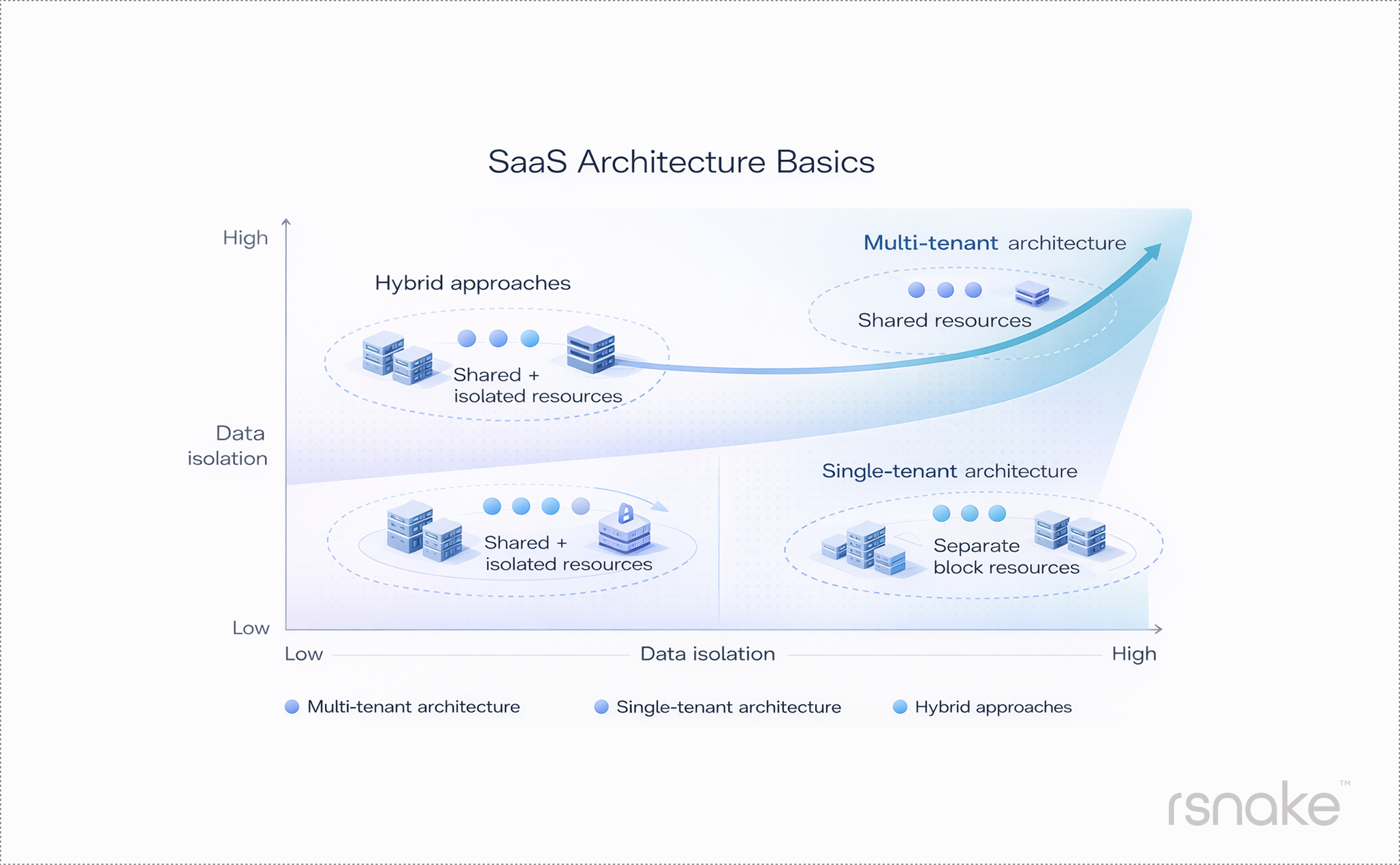
Choosing the right architecture is one of the most critical decisions when building a SaaS platform. It affects scalability, isolation, cost and the complexity of operations.
Multi‑tenant architecture
- Definition: A single instance of the application and database serves multiple customers (tenants). Each tenant’s data is tagged with a tenant_id or stored in a separate schema. All tenants share the same codebase and infrastructure.
- Benefits: Quick to launch, cost‑effective to operate and easier to maintain. Changes roll out to all tenants simultaneously. Most SaaS products start with this model.
- Trade‑offs: Requires strict access control to ensure that tenants do not see each other’s data. Upgrades happen on the provider’s schedule; tenants cannot delay changes.
Single‑tenant architecture
- Definition: Each customer has their own instance of the application and database, often deployed in a separate cloud environment.
- Benefits: Customers can customise the application, schedule upgrades and choose their own infrastructure. Data isolation is strong; there is little risk of cross‑tenant data leak.
- Trade‑offs: More expensive to run and maintain. Vendors must patch and operate multiple instances and provide per‑customer support. Customisation may break compatibility with future releases.
Hybrid approaches
Some SaaS providers adopt a hybrid model: multi‑tenant by default with the option to offer dedicated instances to enterprise customers. This allows smaller users to benefit from shared infrastructure while larger clients pay a premium for isolation. Deciding which approach suits your product depends on your target market, regulatory requirements and the complexity of your features.
Security and compliance baseline for SaaS
SaaS security refers to the practices and tools used to protect the data and applications delivered as a service. Because SaaS products are hosted in the cloud, they face unique risks such as unauthorised access and data breaches. The following checklist summarises the minimum security measures you should implement:
Key security components:
- Configuration management: Ensure default settings are secure, enforce strong passwords and implement least‑privilege access.
- Identity and access management: Support multi‑factor authentication and single sign‑on. Use role‑based access control (RBAC) to restrict what each user can do.
- Data protection and encryption: Encrypt data at rest and in transit. Store secrets in a secure vault. Back up data regularly and test restoration procedures.
- Compliance and governance: Understand the regulations that apply to your domain (GDPR, HIPAA, SOC 2). Maintain an audit log of user actions. Provide a privacy policy and data processing agreement. For businesses serving the UK or Europe, pay particular attention to data residency and cross‑border transfers.
- Secure development practices: Use code reviews, static analysis and automated testing. Patch dependencies promptly. Enforce a vulnerability disclosure process.
Security is an ongoing effort. Schedule regular penetration tests and vulnerability assessments. Educate your team about social engineering and phishing. Include security considerations in every architectural decision.
Tech stack for SaaS development (principles + examples)
Modern SaaS applications are usually web‑first, with optional mobile or API interfaces. Choosing a tech stack is about balancing speed of iteration, reliability and hiring reality. Here are some guiding principles:
- Start simple, scale later. Use mainstream frameworks and managed services so you can move quickly. For example, React or Vue for front‑end development, Node.js or Python for the back end and PostgreSQL for the database. Managed services like Render, Railway, Vercel or AWS Amplify let you focus on the product rather than infrastructure.
- Optimise for developer experience. Pick languages and tools that your team understands and enjoys. Productivity trumps theoretical performance in early stages.
- Design for maintainability. Follow clean coding practices, write tests, document your API and adopt version control. Use continuous integration and continuous deployment (CI/CD) pipelines to automate testing and deployment.
- Prepare for scale triggers. Plan for the moment when you need to shard your database, introduce a message queue or adopt a microservices architecture. These triggers might include sustained traffic growth, large concurrent workloads or strict latency requirements. Document what will cause you to revisit the architecture.
For an API‑first SaaS (for example, a data service consumed by developers), you might choose GraphQL or REST with rate limiting, strong authentication and SDKs for different languages. For a web‑first product, build a responsive front end, invest in design and ensure accessibility.
Where relevant, AI can help you generate code, analyse logs and even build user‑facing features like chatbots or recommendation engines. However, AI should augment the team, not replace critical thinking about architecture and user experience.
Team and delivery model (in‑house vs agency vs hybrid)
Building a SaaS product requires a cross‑functional team: product strategist, UX/UI designer, front‑end developer, back‑end developer, DevOps engineer and marketer. You can assemble this team in‑house, hire freelancers or partner with a development agency. Each option has pros and cons.
In‑house team
An internal team offers direct control over product direction, culture and processes. You can build institutional knowledge and create a permanent capability. However, recruiting and retaining skilled developers and designers is expensive. It takes months to build a cohesive team, and turnover can derail progress. Early‑stage start‑ups often lack the budget and hiring capacity for a full in‑house team.
Freelancers
Freelancers provide flexible capacity for specific tasks (for example, a short‑term UX project). They are cost‑effective for small jobs but may not be suitable for complex SaaS builds. Freelancers work on many projects and cannot offer the continuity or institutional knowledge that a long‑term product requires. Rattlesnake competes with agencies rather than freelancers because the latter rarely provide a holistic product perspective.
Agency/development partner
A specialised SaaS development agency provides an assembled team with broad expertise, covers project management and quality assurance and can start quickly. Agencies often cost less than hiring several full‑time employees, and the client benefits from the accumulated experience across projects. The downside is reduced direct control and potential communication gaps.
Hybrid approach
Some companies retain a small in‑house team for core product knowledge and partner with an agency for design, engineering or marketing. This approach combines institutional control with the flexibility and speed of an external partner.
Costs and timeline to develop a SaaS product
The cost and timeline of building a SaaS platform vary widely based on scope, integrations, data complexity, compliance requirements, user experience depth and billing models. If you plan to develop a complex SaaS product, these variables become even more significant, affecting both technical architecture and long-term operational costs. Broadly, think of SaaS projects in four levels:
- Micro SaaS – narrow focus, perhaps a single feature or integration. These projects can be built by a solo developer, but still require marketing and support.
- Basic SaaS – a simple MVP with core features, basic authentication and minimal integrations. Development time: 3–6 months for an in‑house team or 4–12 weeks with an experienced agency (depending on scope and preparation).
- Medium SaaS – more features, multiple user roles, reporting, and perhaps integrations with payment and email providers. Timeline: six to nine months.
- Complex SaaS – advanced functionality, multi‑tenant architecture with customisations, heavy data processing, strict compliance or AI features. Timeline: nine to twelve months or more.
Several factors influence cost and timeline:
- Scope and number of features. More features equal more development and testing. Keeping the MVP small helps reduce cost.
- Integrations and data complexity. Integrating with third‑party services (payments, CRM, analytics) adds time. Complex data models require careful design and optimisation.
- Compliance and security. Meeting GDPR, HIPAA, or SOC 2 standards adds significant overhead. Additional security testing and documentation are needed.
- Team and governance. Decision latency (how quickly stakeholders respond) and the availability of subject matter experts can accelerate or delay development. Clear governance, weekly demos and fixed feedback loops reduce surprises.
When budgeting, allocate resources for design, development, testing, launch, marketing and ongoing maintenance. Consider the total cost of ownership: hosting, third‑party services, support and updates. A well‑run project may cost more upfront but save money and time in the long run.
Launch, onboarding and retention
The journey does not end at launch. A successful SaaS platform must attract users, help them achieve value quickly, convert them to paying customers and retain them over time. Here is how to approach these phases:
Launch preparation
- Beta cohort. Invite a small group of target users to test the product. Ensure they represent your target segments. Collect feedback and fix critical issues before a wider release.
- Technical readiness. Set up monitoring, alerts and rollback plans. Use feature flags to turn on or off new functionality without redeploying.
Marketing alignment. Work with marketing to craft messaging, landing pages and campaigns that convey your value proposition and pricing. Ensure the copy reflects the user’s pain and the solution clearly.

Onboarding
- Reduce friction. Ask for the minimum information needed to create an account. Offer single sign‑on where appropriate.
- Guide users to the first value. Use quick‑start wizards, pre‑loaded templates and in‑app tips. Track Time to First Value and identify where users drop off.
- Provide context. Explain why certain steps are needed and how they relate to the user’s goal. Use tooltips and progressive disclosure rather than long instructions.
Activation and conversion
- Free trials vs freemium. Decide whether you offer a time‑limited trial or a permanent free tier. A trial creates urgency; a free tier encourages experimentation but may delay conversion. Ensure the upgrade path is clear.
- Communicate value consistently. Send onboarding emails, product tours and follow‑up messages that remind users of the benefits they are about to unlock.
- Support and feedback. Provide chat support, help centre articles and a clear way to report issues. Use user action logs and event replay to reproduce problems, as Rattlesnake’s developers recommend.
Retention
- Measure engagement. Track how often users log in, how deeply they use features, and whether usage is growing or declining. Use this data to trigger personalised messages or interventions.
- Collect feedback. Run regular surveys and interviews. Analyse usage patterns to identify friction. A dedicated customer success team helps maintain relationships and encourages renewals.
- Iterate based on data. Use the feedback loop to improve the product. Add features that increase stickiness and remove those that add complexity without value.
Why Rattlesnake?
Rattlesnake Group is a boutique London‑based SaaS development company. We view product success as a combination of design, development and marketing, not just code. We limit the number of projects we take on so that each one receives personalised attention. Our founders are personally involved in every engagement, ensuring clear communication and strategic alignment at every stage. Unlike some vendors who simply “provide engineers to write code,” we dive into your market, define the user journey, build the product and help you position it for growth. We have a dedicated project manager, but our founders remain in direct contact throughout the project to ensure your vision is realised.
We help migrate the platform from our servers to your cloud and provide flexible support that does not lock you into rigid contracts. For early‑stage start‑ups, we offer tailored arrangements to reduce financial burden while ensuring you get the value you need.
Book a discovery call with Rattlesnake Group. Let’s discuss your SaaS product and map out the smartest way to build it.
Mikael is the Managing Partner at Rattlesnake. With a background in strategy and consulting, he oversees the company's strategic direction, leads key client partnerships, and drives growth through high-impact collaborations.


Ready to start?
Send us an email with your project details, and our team will connect with you within 24 hours to schedule a call.


© 2020-2026 Rattlesnake Group Limited.
Rattlesnake Group Limited is a limited liability company registered in England and Wales. Registered number: 12551349. Registered address: 124 City Road, London EC1V 2NX. VAT Registration Number: 436362592.


